


Local Weather Forecast
4.62.60K Reviews
App Specs
- Version
- 4.27.8
- Updated On
- License
- Free
- Downloads
- 5,000,000+
- Developer
- Tools Dev
- Categories
- Weather
- Platform
- Android
Screenshots
 Analysis by AppCompare
Weather apps are most useful when they answer a small, immediate question: can I leave now, and what should I bring? Local Weather Forecast is a free weather app from Tools Dev that puts nearby conditions at the center of the experience. I’d consider it for quick day-to-day checks rather than as a specialist tool for people who need to analyze every detail of the atmosphere.
If you’re opening it for the first time, keep the goal simple: get a local forecast you can use to make one decision. Check what it shows for your area, then compare the coming hours with the time you expect to be outside. That small routine is more useful than treating any forecast as a guarantee, especially when conditions can change.
Getting Comfortable with the Local Forecast
I find it helpful to treat the local forecast as a starting point for a decision, not a complete plan in itself. In this section, I’ll focus on how to make the first check useful: confirm the place you’re viewing, match the forecast to the time you’ll be out, and then decide whether you need a closer look before leaving.
What to expect from the first screen
The app’s stated purpose is straightforward: help you understand nearby weather. That makes it a natural fit for checking conditions before a commute, a school run, a walk, or an errand. Its current version is 4.27.1, and the app has been available since December 23, 2016. It has an average rating of 4.6 from around 39,000 ratings, with over five million installs. Those figures suggest a well-established choice, though popularity alone can’t tell you whether its presentation suits your habits.
It is rated for Everyone and supports Android 6.0 and later. If you use an older device, checking that requirement before installing can save a little time. The app is free, so it is easy to try as a companion to the weather service already on your phone rather than making an immediate switch.
First setup: make the forecast relevant
On first launch, focus on getting a useful location view rather than exploring every screen at once. If the app asks to use your location, consider whether you want automatic local results or would rather enter or select a place yourself, if that option is available in the app. Location access can make nearby forecasts more convenient, while a manually chosen place may be preferable if you mainly check the weather for home or another regular destination.
Once a local forecast is visible, pause to check that the place shown is the one you mean. This matters if you are near a town boundary, traveling, or comparing home with somewhere you plan to visit. A forecast can look perfectly clear yet be irrelevant if it is attached to the wrong location. Starting with this quick check is a reassuring first success: you know where the information applies before you rely on it.
Worth Reading Before You Choose

EA SPORTS FC Mobile 26 Is a Bigger Football Game, but It Takes Time

Flipboard Shows What News Apps Must Do Beyond the Feed

Switching to Android Auto Means Rethinking Your Driving Routine

Google Calendar Makes a Crowded Week Easier to Manage

Ludo King Makes the Most of the Minutes Between Plans

Baby Panda World Brings Quick Play to Modern Phones, but Its Game Library Feels Busy
The first useful check: plan around the hours
For a practical first test, look at the forecast shortly before an ordinary outing. Say you’re heading out after work to pick up groceries and then walk home. Rather than checking only the current conditions, look at how the weather is expected to develop around the time you’ll be outside. That can help you decide whether to bring a light layer, carry an umbrella, or shift the walk earlier.
Use the forecast as a planning aid, not a promise. A quick glance can help with everyday choices, but the closer you get to a changeable weather situation, the more sensible it is to check again before leaving. I find that habit more valuable than repeatedly refreshing an app without a particular decision in mind.
Useful habits beyond a quick glance
A small workflow makes a weather app easier to use: check the current conditions first, then look ahead only as far as your plans require. For a short errand, the next few hours matter more than a distant outlook. For a weekend visit, a longer-range view can help you pack, but I would treat it as provisional and review it closer to departure.
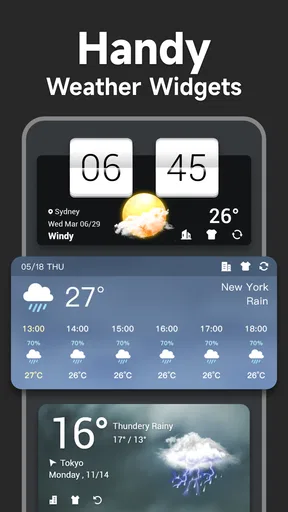
If you use a home-screen widget, it can make routine checks quicker by keeping a weather snapshot in view. The trade-off is that a widget is a summary, not a replacement for opening the app when you need more context. I’d use it to spot whether the day deserves a closer look, then open the forecast before making a time-sensitive plan.
Another helpful approach is to compare the app’s local view with what you can observe outside. If the sky looks different from what you expected, don’t assume the forecast must be right simply because it appears on screen. Weather information is most useful when it informs your judgement, not when it replaces it.
Common confusion and sensible limits
“Local” can sound more exact than any forecast really is. Conditions may vary across nearby neighborhoods, and a forecast for a selected place is not necessarily a precise description of every street around it. If you’re traveling, confirm that you are looking at the destination rather than continuing to rely on your usual home location.
It also helps to separate a general forecast from information meant for urgent decisions. If severe weather could affect your safety, treat alerts as a prompt to pay attention and follow relevant local guidance. Don’t rely on one app as your only source for emergency instructions or assume that an alert will answer every practical question about your route.
Weather apps can differ in how they present the same day, so conflicting forecasts are not automatically proof that one is broken. For a routine choice, such as whether to take a jacket, a broad agreement is often enough. For a plan that depends on precise timing, compare the outlook again nearer the event and be ready to adjust.
Who will get the most from it
I’d recommend trying Local Weather Forecast if you want a straightforward way to check nearby conditions and build a quick weather check into your routine. It is especially suitable for someone who wants practical context before commuting, walking, or running errands, without turning weather into a hobby. The free price also makes it a low-commitment option for seeing whether its approach works for you.
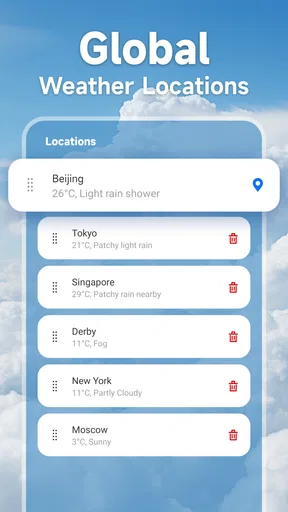
It may be less suitable if you need highly specialized meteorological information, detailed planning tools, or a particular presentation style that this app does not offer. A frequent traveler may prefer a service that makes switching between saved destinations especially central to its workflow. Someone who already likes the built-in weather app on their phone may not gain enough from adding another app unless this one gives them a clearer local view.
How it fits beside other weather options
The usual alternatives are a phone’s preinstalled weather app, a web forecast, or a service designed for more detailed weather tracking. A built-in app can be the easiest choice because it is already on your device. A browser forecast can be handy when you don’t want another app. A more specialized service may be a better fit if you regularly need deeper analysis or tools for a specific activity.
This app’s appeal is the focused local-weather role suggested by its name and description. I’d judge it by how quickly you can find the conditions that matter to your day, not by whether it replaces every other source. If you want a dependable everyday starting point, it is worth a try; if you need a particular advanced capability, choose around that need instead of assuming a general forecast app will cover it.
A few practical questions to settle as you use it
Should you keep it alongside your current weather app? I would at first. Try checking both for a few ordinary days and notice which one makes the next decision easier. If you find yourself opening this app consistently, it has earned a place in your routine. If you keep returning to the other one, there is little reason to force a switch.
Do you need to check it constantly? Usually not. A check before leaving and another when plans depend on changing conditions is a more useful pattern than refreshing without a reason. And should you trust a longer-range forecast when making plans? Use it to prepare broadly, then revisit it closer to the date before committing to weather-sensitive details.
Will it work for every location you care about? Start with the place you use most, then check the location shown whenever you travel or plan around somewhere else. That simple habit prevents one of the easiest weather-app mistakes: acting on a forecast for the wrong place.
First impressions and user interface
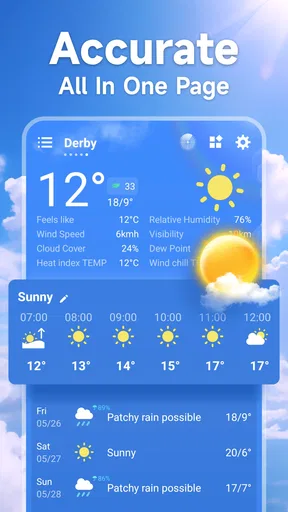
Opening the app, you're greeted with a sleek and minimalist design. The interface is refreshingly simple, which makes navigating through different features a breeze. No clutter, no chaos—just straightforward weather details. Right from the home screen, you get a snapshot of the current temperature, weather conditions, and a nifty little icon that visually represents what's happening outside. It’s like having a meteorologist in your pocket, minus the suit and tie.
Features that stand out
The app offers a range of features that cater to both casual users and weather enthusiasts. Let's break down some of the standout elements:
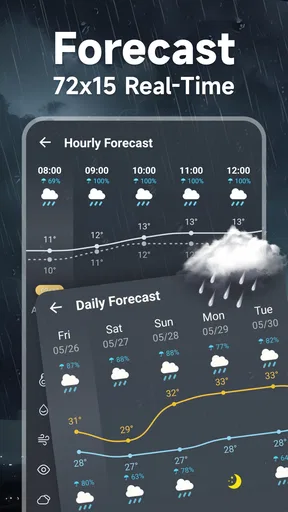
- Hourly and daily forecasts: Need to know if you should pack an umbrella for later? The hourly forecasts give you a detailed look at the weather changes throughout the day. And if you're planning a weekend getaway, the seven-day forecast has you covered.
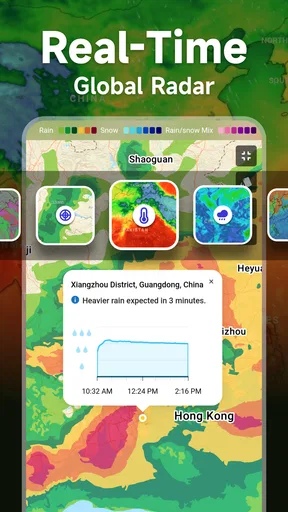
- Weather maps: With interactive maps, you can visualize weather patterns in real time. The radar feature is particularly useful for tracking storms or precipitation.
- Severe weather alerts: No one likes surprises, especially when it comes to severe weather. The app sends you timely alerts to keep you informed and safe.
- Customizable widgets: For those who love having everything at a glance, the app offers widgets that you can customize according to your preferences. Place them on your home screen and get weather updates without even opening the app.
Performance and usability
The app runs smoothly on both Android and iOS devices, with no noticeable lag or crashes during my testing. The developers have clearly put a lot of effort into ensuring the app is both responsive and reliable. Even on older devices, the performance remains solid. The data is pulled from reputable weather sources, ensuring accuracy in forecasts. Whether you’re checking the weather for a quick grocery run or planning a long road trip, the app delivers the information promptly.
Personal experience and verdict
Using the app has been a game-changer for me. As someone who relies heavily on weather forecasts for daily planning, having accurate and real-time data has made life a lot easier. I particularly appreciate the severe weather alerts, which have proven to be incredibly timely and useful, especially during those unpredictable stormy days. The intuitive design and user-friendly interface make checking the weather feel less like a chore and more like a part of my routine.
Overall, the app delivers on its promises, providing comprehensive weather updates in a pleasantly simple package. Whether you're a weather enthusiast or just someone who wants to avoid getting caught in the rain, this app is definitely worth a download. I’d start with one local check before a routine outing, then decide whether its forecasts and layout fit the way you plan your day.
Pros
- Accurate real-time updates.
- User-friendly interface design.
- Customizable notifications.
- Detailed radar maps.
- Minimal battery usage.
Cons
- Ads can be intrusive.
- Limited free features.
- Occasional loading delays.
- Requires internet connection.
- Lacks offline mode.
FAQs for Local Weather Forecast
How accurate is the Local Weather Forecast app?
The Local Weather Forecast app is designed to provide highly accurate weather updates by using data sourced from reliable meteorological organizations. It uses real-time information and sophisticated algorithms to deliver precise forecasts. However, like all weather apps, occasional discrepancies may occur due to unforeseen changes in weather patterns.
What features does the Local Weather Forecast app offer?
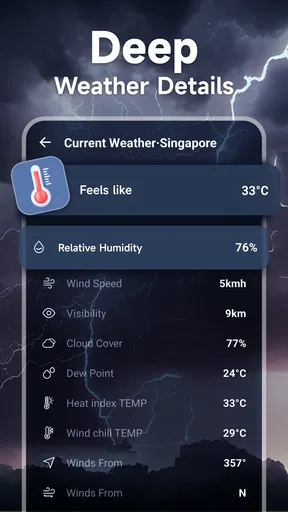
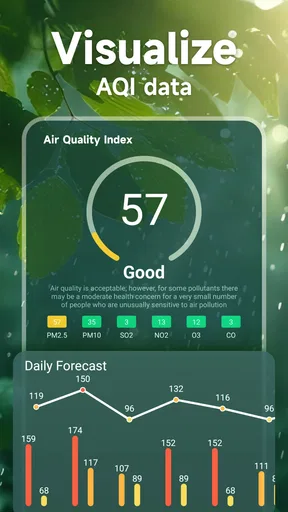
The app offers a variety of features including real-time weather updates, 7-day forecasts, radar maps, severe weather alerts, and customizable notifications. Users can also access detailed information such as humidity levels, wind speed, and UV index, making it a comprehensive tool for staying informed about weather conditions.
Is the Local Weather Forecast app free to use?
Yes, the Local Weather Forecast app offers a free version with essential features. However, there is also a premium version available for purchase that includes additional features such as ad-free experience, more detailed data, and advanced radar capabilities. Users can choose according to their needs.
Does the app require an internet connection to function?
The Local Weather Forecast app requires an internet connection to provide real-time updates and forecasts. However, some features like previously downloaded forecasts can be accessed offline. For the most accurate and current information, it is recommended to use the app while connected to the internet.
Can the Local Weather Forecast app send weather alerts?
Yes, the app can send push notifications for severe weather alerts, ensuring users are informed of any significant weather changes. Users can customize the types of alerts they receive, such as storm warnings or temperature drops, allowing them to stay prepared for various weather conditions.


